Frequently asked questions
Effective August 29, 2025, the United States has suspended its duty-free “de minimis” threshold of US$800 for all countries, including Canada. All postal shipments valued under US$800 to the U.S. will require prepaid duties before the package crosses the border.
Find answers to common questions about shipping to the U.S. after the de minimis suspension.
1. Duties and tariffs essentials
Expand all Collapse all
-
A tariff is a policy or schedule set by a government that specifies the taxes to be applied on imports (and sometimes exports). Tariffs are often designed to regulate trade, protect domestic industries, or generate government revenue.
A duty is the actual tax or fee charged on a specific shipment or good, based on the tariff. It is the amount of money paid by the importer when the goods enter the country.
For example, if the tariff rate on leather shoes is 10%, the duty on a shipment worth $5,000 would be $500.
-
As the merchant, you have several options you can select from or combine with:
- Pass it to the customer at checkout. Your shopper will then pay the landed cost before placing the order.
- Include duties in U.S. prices – you can raise your U.S. price lists to cover expected duties and keep checkout clean and simple.
-
If you are a merchant selling items to the U.S. and want to know how much duty you will be charged for shipping an item, you can:
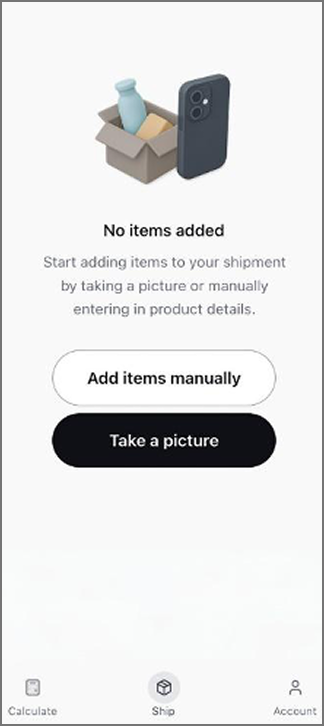
- Use the Calculate feature in the Zonos Prepay app to see the HS code, duty rate, and other item information.
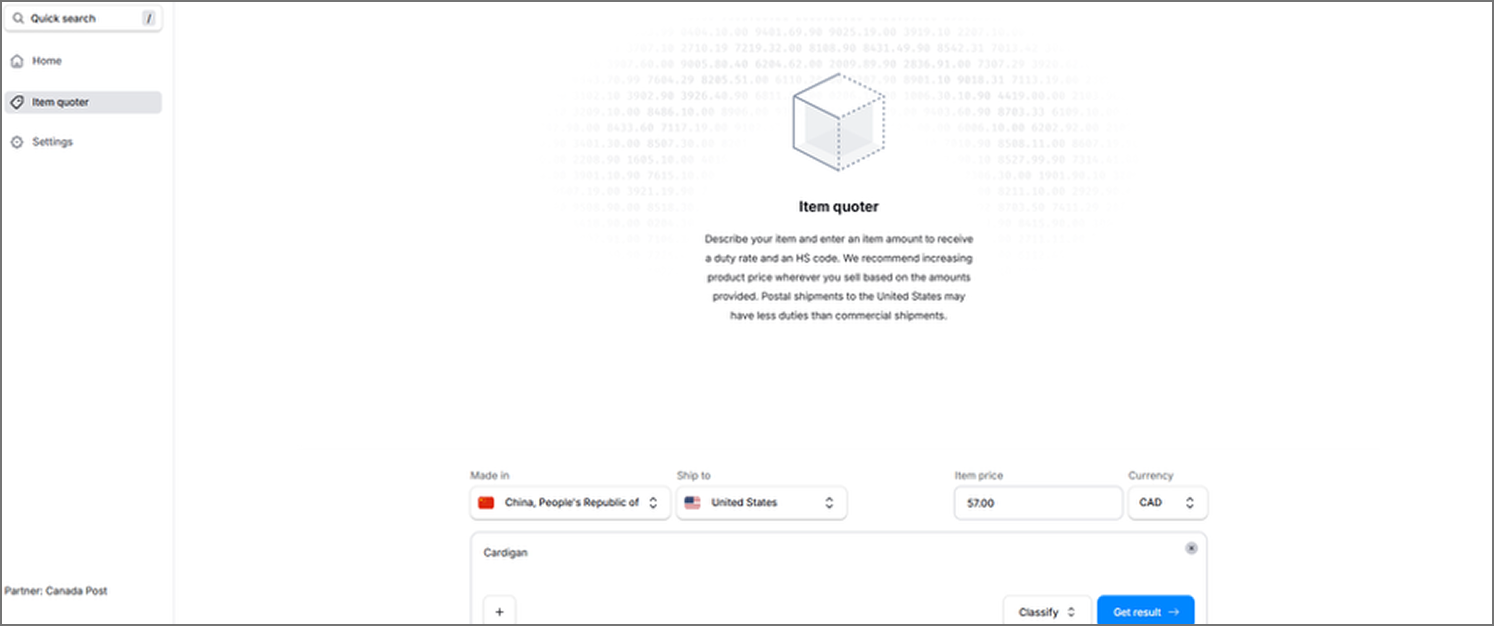
- Refer to Item quoter in your Zonos Dashboard Lite via your Verified Account to classify your item to generate or validate HS codes based on your item description (and/or image if available). Check coherency (if the HS code matches your product description) and view country-specific tariff breakdowns and estimate duty/tax rates.
-
No, the duty change only applies to goods valued under US$800. Goods valued above US$800 are subject to the normal U.S. tariff rates for their respective category. These items will still be processed regardless of their country of origin. The duty change does not affect them.
-
Yes, although the U.S. executive order does not apply to goods over US$800 (duties for these items will continue to be collected upon delivery by USPS), a Declaration ID must still be created for each shipment. No duty will be charged or invoiced to your account – whether through your Zonos Verified Account or through the Prepay app.
Note: There is no processing fee applied to these shipments.
-
Yes, shipments to U.S. Territories (American Samoa, Guam, Northern Mariana Islands, Puerto Rico, and the U.S. Virgin Islands) require prepaid duties and taxes, which means a Declaration ID must be included.
-
After August 29, 2025, CUSMA duty-free treatment is still available, however, CUSMA-originating goods from Canada and Mexico are not exempt from IEEPA tariffs for postal shipments. All postal shipments pay IEEPA rates regardless of CUSMA qualification.
-
U.S Customs and Border Protection (CBP) has confirmed that most Annex II exemptions under Executive Order 14257 do not apply to international postal shipments valued under US$800. These exemptions mainly apply to commercial shipments and those over US$800.
However, postal shipments under US$800 still qualify for exemptions related to informational materials, including items classified under Chapter 49 (e.g. books, newspapers, magazines, pictures, manuscripts), certain headings (3704–9705, photograph / film-related goods), and specific subheadings such as 6307.90.30 (parts of textile furnishings), 8523.80.10 (recorded media / tapes / cassettes or similar formats), and others.
2. Documentation and compliance
Expand all Collapse all
-
A Declaration ID is a unique 13-character code that proves you've completed your customs declaration and paid the required duties. Under U.S. regulations, every parcel under US$800 entering the country by mail must have duties prepaid. Without a Declaration ID, Canada Post will be unable to ship your item to the U.S.
-
Shipping labels do not require a declaration ID to be visible on the label. If a U.S.-bound shipping label was generated through available Canada Post DDP solutions, then this is confirmation that a declaration ID has already been created by Zonos.
Canada Post will issue the shipping labels because the declaration ID confirms Zonos will connect and remit duties to CBP on your behalf.
Note: Our DDP solution is currently not available for merchants using a Custom Developed Shipping System (CDSS) or a third-party shipping system (3PSS). If a U.S.-bound shipping label is created through one of these offline systems, it will not have a Declaration ID attached to it and is subject to rejection by Canada Post and/or U.S. Customs and Border Protection (CBP).
-
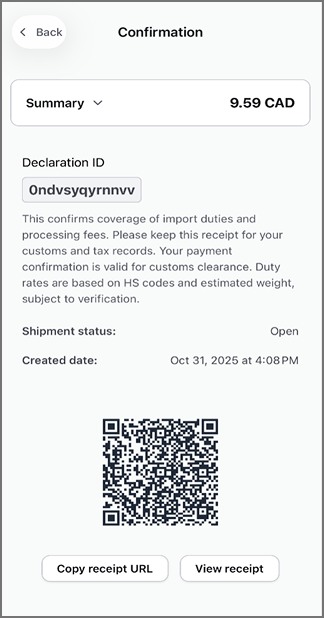
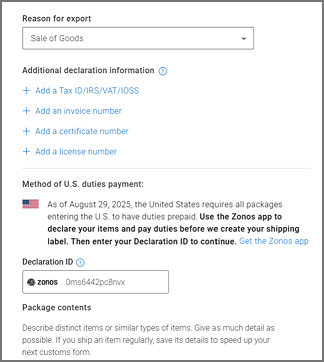
You can find the Declaration ID in the following areas:
- On your receipt generated through the Zonos Prepay app
- On your invoice from your Verified Account
- On your customs form: After generating a shipping label, select Edit for the specific parcel, scroll down to view the Declaration ID
-
Zonos has a direct integration with Canada Post for providing cross-border shipping capabilities including cost calculations, duty/tax collection and customers documentation. Our system expects duties and taxes to be billed to Zonos and requires the Zonos Declaration ID or documentation to appear on paperwork. With Canada Post, you must use Zonos-generated documentation and declaration processes.
-
A Declaration ID may not work if:
- It has expired (IDs expire after 5 days if not linked to a tracking number)
- It was already used
- It was cancelled
Note: You won’t be charged duties or fees for expired or canceled Declaration IDs. Use the Zonos Prepay app to create a new one.
-
When a Declaration ID is first created, it remains in a pending state. Your payment is only finalized once the shipment is linked to a Canada Post tracking number.
- If the Declaration ID is not linked to a tracking number, it will automatically expire after 5 days, and your credit card will not be charged. No action is required on your end in this case.
- If your Declaration ID is already linked to a tracking number, you can still cancel the payment – but the shipping label must be voided first.
To cancel a Declaration ID linked to a tracking number:
- Void the label by requesting the postal clerk to void the transaction at the retail counter. If you created the label in Canada Post Snap Ship™ or Shipping Manager, please contact support@zonos.com with proof that the label was voided.
- Go to your confirmation page
- Select Cancel order
Zonos will verify the label status and issue a refund if the cancellation is valid.
-
If you’re experiencing issues with the QR code appearing, you can show the Declaration ID to the postal clerk – they can manually enter in the number for your Declaration ID.
-
With the suspension of the $800 exemption, all items shipped into the US – regardless of value – must include Country of Origin, as required by U.S. Customs and Border Protection (CBP) to calculate tariffs and clear customs.
The Country of Origin (Country/Region of Manufacture) is the country where the product was made, produced, or substantially transformed. It is not necessarily the country from which the product ships.
Note: Canada Post has also made Country of Origin a mandatory field in our systems for all other international destinations.
-
Missing or incorrect Country of Origin information may lead to:
- Delays and rejections at customs
- Incorrect tariff application
- Higher costs than expected
3. Shipping and operational scenarios
Expand all Collapse all
-
Canada Post does not support multiple boxes in a single shipment through the Prepay app.
If you’re sending more than one box:
- Enter the contents for each box individually
- Pay duties for each box separately
- Get a Declaration ID for each box
-
If you've already linked a Declaration ID to a tracking number, you can still receive a refund for duties – but you must first void the associated shipping label with Canada Post.
Steps to request a refund:
- Void the shipping label linked to your Declaration ID by requesting the postal clerk to void the transaction at the retail counter. If you created the label in Snap Ship or Shipping Manager, please contact support@zonos.com with proof that the label was voided.
- Visit your confirmation page
- Select Cancel order
Once submitted, Zonos will automatically validate whether the label has been voided. If confirmed, your payment will be refunded.
-
If you created a shipping label and a Declaration ID is generated, but you decide not to use that label or cancel the shipment, your credit card will not be charged. Zonos only bills when a package is dispatched for delivery.
-
Unfortunately, duties and taxes paid on the original shipment are non-refundable. If you resent the item, it will be treated as a new import and it will be subject to duties again.
-
The Zonos App provides consumers with the option to initiate a return to you.
It’s important for your business to clearly communicate your return policy and be transparent about the return location:
- If returns are sent within Canada: Your current process with Canada Post and customer experience will stay the same.
- If returns are sent to the U.S. with Canada Post: A new Declaration ID will be required to generate the return label, since the item is crossing the border again. According to U.S. Customs and Border Protection (CBP) U.S. postal returns are not duty-free and require duties to be paid.
However, there are a few exceptions where no additional duties or fees will apply:
- Undeliverable items with the original U.S. S-10 Bar code and the package intact
- Refused items with the original U.S. S-10 Bar code and the package intact
-
As the merchant, you have two ways to manage U.S. returns:
- Provide a prepaid return label to your customer and prepay any applicable duties and fees. This simplifies the return process for your customers and gives you the flexibility to decide how costs are handled. You can:
- Cover the full cost: Pay the return shipping and any applicable duties and fees, or
- Share or pass on the cost: Charge part or all the shipping, duties/fee costs back to the customer.
- Have your customer use the Zonos Prepay App to initiate their return. They’ll need to:
- Select Is a return in the app
- Specify where the item was made
- Pay any applicable duties and fees
- Obtain a Declaration ID, which they’ll need to present when dropping off the package at a Canada Post retail location.
-
It’s important for your business to clearly communicate your return policy and be transparent about the return location:
- If returns are sent within Canada: Your current process with Canada Post and customer experience will stay the same.
- If returns are sent to the U.S. with Canada Post: A new Declaration ID will be required to generate the return label, since the item is crossing the border again.
-
If a package is returned to sender by Canada Post before leaving Canada, no refund is needed, as duties were never charged.
If a shipment left Canada but was returned at U.S. Customs, duty refunds are not currently available with Zonos.
If a package clears U.S. Customs but is later returned after a delivery attempt was unsuccessful (for example, if it was unclaimed, refused, or the address was invalid), duties cannot be refunded, since the shipment has already been processed and cleared by U.S. authorities.
-
The suspension of the US$800 de minimis exemption does not change the induction process with Canada Post. All shipments will continue to be inducted and processed as they are today. The change only affects tariff application at the border, not the operational workflow.
-
Not currently. Instead you can:
- Use Zonos’s Classify to generate accurate HS codes and duty rates, allowing you to build duty into your shipping or product cost.
- Use the “Calculate” feature of the Prepay app to see the HS code, duty rate and other item information.
- Upload rate sheets into your Zonos Dashboard
- Refer to this Zonos document to learn how to create a custom service level with a rate sheet.
You can also reach out to the Zonos Support team at support@zonos.com team for assistance
4. Shipping documents and gifts
Expand all Collapse all
-
A “document” is considered a paper-based shipment with no commercial value. Examples include invoices, statements or advertisements.
“Merchandise” is a paper-based shipment with commercial value. Examples include magazines, books, calendars or trading cards.
Note: Shipment weight (over or under 500 grams) does not determine whether a shipment is a document or merchandise.
-
You do not need to pay duty if you're shipping documents with no commercial value (as defined above). However, if you include goods or merchandise (even in a document envelope), the shipment will be treated like a regular parcel and duties will apply.
-
What qualifies as Letter-post: Letter-post is limited to documents with no commercial value (as defined above), up to 500 grams (1.1 lb). Examples include brochures, flyers, personal correspondence or annual reports.
What does not qualify as Letter-post: Books, purchased magazines, or any goods being sold to the recipient. If a U.S. customer purchased the item, it is considered merchandise and cannot be sent by Letter-post.
Weight and size limits: A Large Envelope can be up to 380 mm × 270 mm × 20 mm (14.96" × 10.62" × 0.8") and must weigh no more than 500 g (1.1 lb). Anything heavier or larger will be treated as a parcel/packet and charged parcel rates.
Duties and taxes: Even if your documents exceed the Letter-post limits and are charged parcel rates, they are still classified as documents and should not be subject to duties or taxes.
Declaration ID: A Declaration ID is not required for Letter-post, but if your item has any commercial value, it will need to go through Zonos to obtain a Declaration ID for proper customs clearance.
-
If your shipment includes a business name or looks like a purchase, it will not qualify as a gift – even if marked as one.
To qualify as a gift, the package must:
- Be sent person-to-person
- The label must include "Unsolicited Gift" in the item description
Duty charged on gifts:
- Gifts under US$100: No duty required
- Gifts US$100 or more: Duty will be charged
Note: There are no fees or charges applied to gifts under US$100
In-app confirmation required for gifts:
- I did not sell or receive any compensation for this item
- I am not a business
- I did not purchase this item while on vacation to send home
-
If you’ve accidentally marked the item as a “gift”:
- CBP may reclassify the package correctly and charge duties accordingly
- The package could be delayed or held for further inspection
- The package may be sent back to you and additional costs will be incurred
5. Zonos account and tools
Expand all Collapse all
-
The Zonos app is free to download. In addition to paying duties, there are fees for remittance and processing:
- $3.99 remittance (converted): This is the amount is transferred after currency conversion, shown in Canadian dollars.
- 10% processing fee: A 10% service fee is charged for handling the payment and conversion.
Tip: If you use the “Take a Picture” option while setting up your shipment, you’ll get a $1 CAD discount. If you skip the photo and enter the details manually, you won’t receive the discount.
Note: There are no fees and charges applied for shipping documents, or to items valued over US$800.
-
When you use your Zonos Verified account, you can expect the following:
- $1.99 remittance fee: A flat charge for transferring the duties and taxes you collect to CBP.
- 10% of calculated duties (disbursement and bond fee): A service fee based on the total duties owed. This covers the cost of advancing the duties on your behalf and providing the required customs bond.
Note: There are no fees and charges applied for shipping documents, or to items valued over US$800.
-
If you sign up for a Verified Account using Canada Post’s referral link or if you’re using the Zonos App, there is no subscription fee. Zonos Dashboard Lite is free for Canada Post business customers. Your Verified Account will give you access to tools that calculate the duties on your products, allowing you to build the true cost of cross-border shipping into your product or shipping price.
Example: If your ecommerce store is integrated with Canada Post and Shopify, the same no-subscription-fee benefits applies. You can use the Dashboard to increase your product prices on your lists.
However, if you’re shipping higher volumes and are looking to use the Zonos Duty and Tax app from the Shopify Store to pre-capture duties at checkout from your customers, an annual subscription fee applies.
-
As a verified Account, you get access to:
- Item quoter
- Order History
- Invoices
- Shipment History
- Settings
-
No, you do not need a Verified Account if you are printing your Canada Post labels via Shopify. Shopify has facilitated a partnership with Canada Post and Zonos to create Canada Post labels with prepaid duties. They handle the billing and remittance of duties to CBP with Zonos on your behalf. There are a couple of steps to set this up in Shopify. Currently, this only supports labels through Shopify Shipping to access Canada Post services ("Bring Your Own Canada Post Account" is currently not supported).
-
If you receive an error code during Verified Account setup, please contact Zonos Support:
- Email: support@zonos.com
- Help Center: https://docs.zonos.com
- In-app support chat: Available within your Zonos dashboard.
For integration or technical errors related to Canada Post’s systems, you may also contact your Canada Post sales representative.
-
You can locate your Account Key in your Zonos Dashboard via Dashboard → Settings → Integrations → Account key.
-
Log in to your Canada Post account, in the navigation, select Shipping, choose Shipping Tool, Select Account preferences, Enter your Account key.
-
The following third-party platforms are currently integrated with Canada Post and Zonos:
- Ecommerce platforms: Shopify, Shopify (PluginHive), WooCommerce (PluginHive)
- Marketplaces: Etsy, eBay, Whatnot
- Shipping systems: Machool, OrderCup, Netparcel, 2Ship, ShipRush, ShipWise/Desktop Shipper, Think Logistics, Shippo, Easyship, ShipStation, Easypost
Note: Shopify and netParcel have facilitated their own built-in integrations with Canada Post and Zonos, which support label creation with prepaid duties. Using your own Canada Post account for carrier-calculated shipping is not supported for U.S.-bound shipments on these platforms.
-
If something looks incorrect (such as the item value, description or country of origin), the app will ask you to review and update your details. In some cases, you may be asked to upload a receipt photo to verify the item's value.
-
When you take a photo of your items, the app uses image recognition to automatically identify them, estimate their value and predict the country of origin. You'll always be able to review and edit the details before confirming payment.
6. Billing, invoicing and payments
Expand all Collapse all
-
Your Zonos invoice provides a detailed breakdown of all the charges that apply to your Verified Account. You’ll only see charges that are relevant to your Canada Post shipments.
The total amount on your invoice is always displayed in Canadian dollars (CAD).
Each invoice summary report includes the following details:
- Tracking number: The Canada Post tracking number for the shipment.
- Invoice ID: The unique ID assigned to your invoice.
- Invoice date: The date you were invoiced.
- Batch date: The date the shipment was sent to Zonos.
- Currency: The currency used for the transaction (e.g. CAD).
- Duty: The duty amount collected on the shipment.
- Clearance fee: The fee charged for customs clearance services.
- Total: The total amount billed for this shipment, including duty and clearance fees.
- Transaction type: The type of transaction (e.g., original order, order cancellation, charge, credit, or invoice refund — issued when an entire invoice is refunded).
- Memo: Additional notes related to the invoice charge.
- Shipment details: A link to your Zonos Dashboard to review the shipment details
-
With a Verified Account, Zonos will invoice you directly to collect the duties and postal clearance fees for all your U.S.-bound postal shipments valued under US$800.
How it works:
- Zonos will invoice you after a shipment has been cleared by U.S. Customs for delivery. As a result, there will be a delay between the time you ship a package and when you receive an invoice.
- Once an invoice is generated, your payment method on file (credit card) will be charged within 24 hours.
- CBP will be reviewing shipments at the border. If CBP reassesses a shipment and charges additional duties, you will be invoiced these additional duties on your next invoice. These charges will be listed as a "CBP adjustment" in the memo field of the invoice and the Transaction Type will be a charge.
- If you created a shipping label and a Declaration ID is generated, but you decide not to use that label or cancel the shipment, your credit card will not be charged. Zonos only bills when a package is dispatched for delivery.
-
Once your account receives its first invoice, Zonos will automatically bill you every 24 hours for any new shipments that have been cleared for dispatch or have left Canada.
-
Your shipments will appear in Dashboard once shipment data is received from Canada Post. In most cases this is daily, though sometimes it may take a few days from when you ship your parcel.
-
Invoices can be found in your Zonos Dashboard Lite under Invoices. These invoices include a breakdown of duties per shipment and are available to download/export.
-
To view your invoice in your dashboard:
- Go to Dashboard → Invoices.
- Select the invoice.
To export your invoice as a CSV:
- Go to Dashboard → Invoices.
- Select the invoice.
- Select Generate report in the top right of the page.
To export your invoice as a PDF:
- Go to Dashboard → Invoices.
- Select the invoice.
- Select Invoice PDF in the top right of the page.
- Find the invoice in your Downloads folder.
Note: PDF invoices currently display only the total invoice amount, not a breakdown by shipment. Improvements are currently underway.
To view any pending shipments that have not been invoiced:
- Go to Dashboard → Invoices.
- Select the Generate pending shipments report in the top right of the page to export a CSV of shipments that have not yet been invoiced.
To filter invoices, you can toggle between different statuses (Paid, Open, Past due, and Void) and apply additional filters by total amount and date.
-
The cost of the processing/clearance fee is listed in your Zonos Dashboard Lite under Settings, Billing, Plan.
-
If the credit card connected to your Zonos Dashboard account is expired or invalid, and you have shipped packages on your account, you will receive an email notification requiring payment of your duties and postal clearance fees. That email will include a secure link where you can complete your payment.
Failure to pay outstanding invoices after 1-3 days will result in your Account Key being deactivated. While deactivated, you will be unable to create a Declaration ID or ship with Canada Post to the U.S. until all overdue duty invoices have been paid.
-
To understand the total landed cost of your U.S. shipments, you can compare your Zonos invoice (duties and applicable fees) with your Canada Post invoice (shipping charges) in a few simple steps.
1. Locate the tracking number
- On your Zonos invoice, find the tracking number listed for each shipment
- This number identifies the same shipment on your Canada Post invoice
2. Match shipments across invoices
- Use the tracking number to match each line item between your Zonos and Canada Post invoices
- This ensures you’re comparing the same shipment in both systems
3. Add up to the totals
- Combine the shipping costs from your Canada Post invoice with the duties and fees from your Zonos invoice
- The combined number amount represents your total landed cost for that shipment
Note: Small timing differences can occur if a shipment clears or bills on a different date.
Tip: Keeping a simple spreadsheet to log tracking numbers, shipping costs, and duty amounts can help make reconciliation clear and consistent each billing cycle.
-
In your account refer to Orders and select Order History to view the details of previous orders, including duty payment status and related receipts.
-
For questions about your invoices, please contact support@zonos.com. Please do not open a charge back. If you open a charge back, your Verified Account will be immediately deactivated by Zonos.
For questions about invoice reconciliation, tracking and delivery, lost or damaged packages, and customs clearance delays, please reach out to your Canada Post sales representative or call 1-800-267-1177.
Disclaimer (effective November 11, 2025) Duty rates, tariffs and trade policies continue to evolve and are subject to ongoing change. The information here is for general informational purposes only and does not constitute legal, financial or tax advice. The content has been compiled from government, industry or other publicly available sources, which may change without notice and have not been independently verified by Canada Post. The user assumes full responsibility for determining the applicability of any information provided. Prior to acting, users should seek independent professional advice tailored to their specific needs and situation
© Canada Post Corporation