How do I access local mode in EST 2.0?
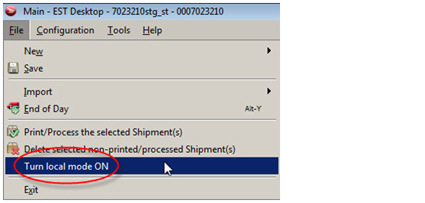
From the File menu, select Turn local mode ON before the scheduled outage (while still online and connected to Canada Post servers).
Who can use local mode?
You can use local mode if:
- You are a commercial customer who prints shipping labels and then creates a manifest.
- You store your address books locally (this must be done before the outage), or you do not use address books (i.e., you import your addresses for your shipments). Read about how to view or change your address book location.
- You have printed labels in your current EST 2.0 installation within the last 90 days.
Note
If you are a Solutions for Small Business customer who pays for each label and transmits as you print, you cannot use local mode.
Features and options not available in local mode
You cannot print a label in local mode if:
- The option to “Create xxx identical shipments” is greater than 1.
- COD and the preference “include shipping cost in COD amount” are both selected.
- The destination is outside Canada and the preference “print postage rate on label” is selected.
- An option (other than those already included in the shipping service) is selected in View (4) – Prepaid Unlabeled.
Limitations in local mode
Please note the following limitations of local mode:
- Imported orders will only be available on the EST workstation on which they are imported (i.e., they are not shared among the EST workstations in a workgroup).
- Labels stored on the server cannot be printed/reprinted while you’re in local mode.
- No bulk processing is available (i.e., no bulk editing of imported shipments)
- If you have multi-client installations in the same workgroup, you will not be able to see each other’s labels or imported shipments (each label created in local mode is stored on the local workstation only).
-
There are a limited number of locally stored reserve PINs available for each shipping service. The number of reserve PINs for each service is equal to either:
- The largest volume you have shipped in a day for each service (in the last 90 days), or
- The minimum for each barcode range based on the table below (if you have never shipped the service before and therefore have no daily volume allocated).