How to create a service ticket report in Intelligence 360

This report shows you the status of service tickets your company has created for items that are late, lost and damaged.

Use the following steps to create a report:

  1. Pick My reports in your menu bar.

    Intelligence 360 navigation menu with “My reports” option highlighted.
  2. Open the Create new report button.

    Intelligence 360 menu with “Create new report” button highlighted.
  3. Select Create in the “Service ticket report” box. You can preview the report before you create it.
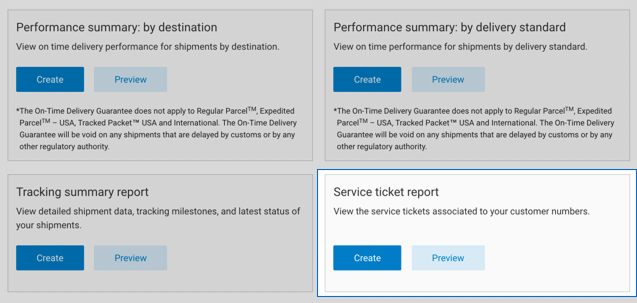
    Intelligence 360 “Create new report” menu with “Service ticket report” option highlighted.
  4. Enter the Start and End date of the time period* you want your report to cover.
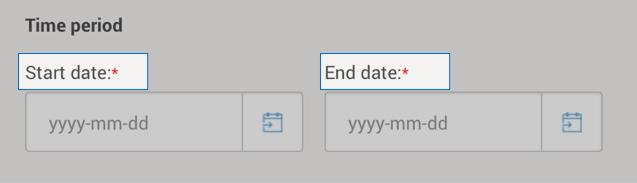
    Intelligence 360 time period selection.

    *You can access information as far back as 2 years. But you can't pull up information prior to the time you set up Intelligence 360.

  5. Pick the Customer number(s) whose data you want in the report. "Select all" customer numbers is the default.
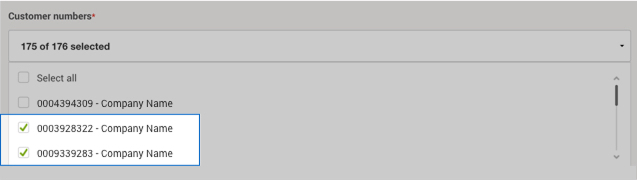
    Intelligence 360 “Customer numbers” drop down list.
  6. Pick the Ticket Status you want a report on. "Select all" ticket status is the default.
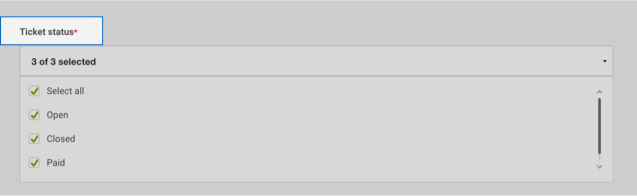
    Intelligence 360 “Ticket status” drop down menu options.
  7. Enter a Report title, Email address and format to download.
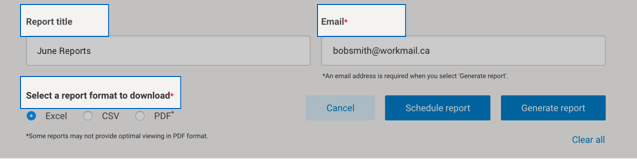
    Intelligence 360 menu with fields for a report title, email address and download format fields highlighted.

You can schedule a report to run on a recurring time frame, or generate a report immediately.

Once a report is generated, you can:

  • Download it
  • Add it to your favourites (up to 5 are allowed)
  • Edit it
  • Schedule, email and save as a template

Ticket status definitions

Service tickets Ticket status Definition
Open A service ticket has been created and it is under investigation by Canada Post.
Closed A service ticket has been actioned and it is now closed. No payment has been issued by Canada Post.
Paid A service ticket has been actioned and it is now closed. Payment was issued by Canada Post, the amount paid is indicated on the report.

